Design Objects
Applications in eizen agentic platform group together related objects that collectively support one or more business use cases. They also enable deployment of these objects across different environments, ensuring consistency and reusability.
Each design object serves a specific function within the system. Applications typically include multiple objects, grouped by their shared purpose to form a complete solution.
From a technical perspective, applications do not directly contain these objects. Instead, they maintain a list of associated objects, allowing for flexible organization and reuse.
The Objects view displays all available objects regardless of their application association, giving users a comprehensive overview of design assets within the environment.
Object Visualization
In eizen agentic platform, object icons are shown in different colors depending on the object type when displayed in grids and other views.
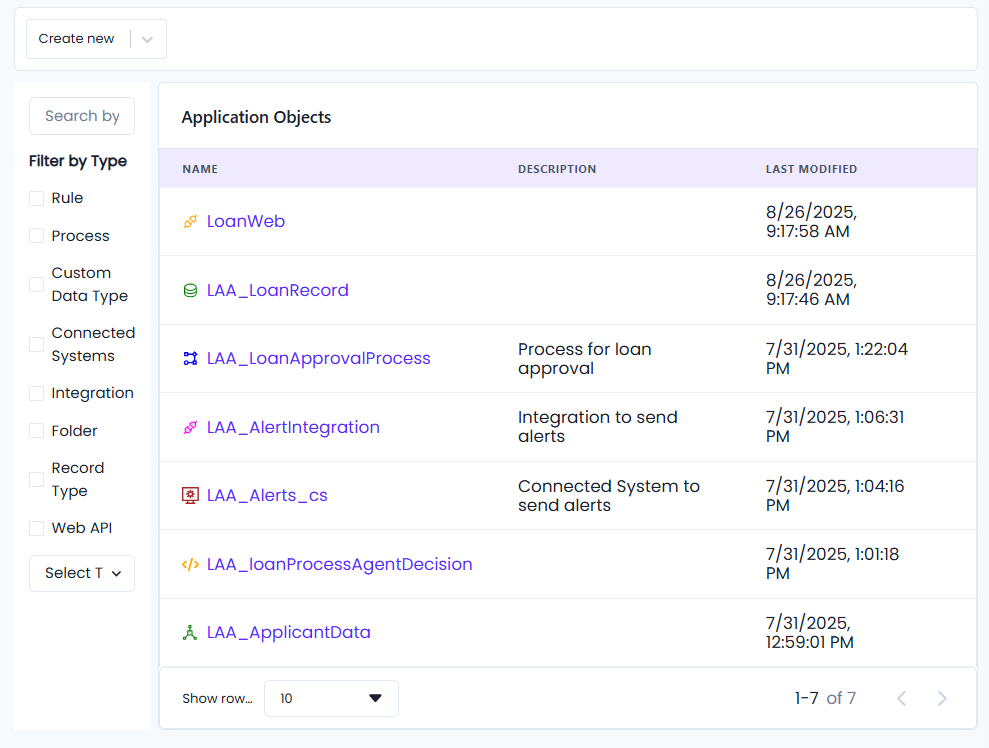
Types of Design Objects
Objects can serve different roles in your application, such as:
- Web API – Interfaces for users to interact with, e.g.,
LoanWeb. - Record Type – Represent structured data, e.g.,
LAA_LoanRecord. - Process – Define business logic or automated flows, e.g.,
LAA_LoanApprovalProcess. - Integration – Connect with external systems or services, e.g.,
LAA_AlertIntegration. - Connected Systems – Define systems or APIs that interact with your application, e.g.,
LAA_Alerts_cs. - Rule – Define reusable business logic that governs application behavior, e.g.,
LAA_loanProcessAgentDecision. - Custom Data Types – User-defined data structures that extend beyond standard types, allowing applications to model domain-specific information, e.g.,
LAA_ApplicantData.
The following sections describe each category of eizen agentic platform design objects in detail:
- Data Objects - Define structure and format of information
- Process Objects - Represent workflows and business logic
- Rule Objects - Define reusable business rules
- Integration Objects - Enable connectivity with external systems
- CMS Objects - Manage content and organization
- Object Naming Standards - Learn about naming conventions